Fixing Wi-Fi Dropouts on Steam Frame

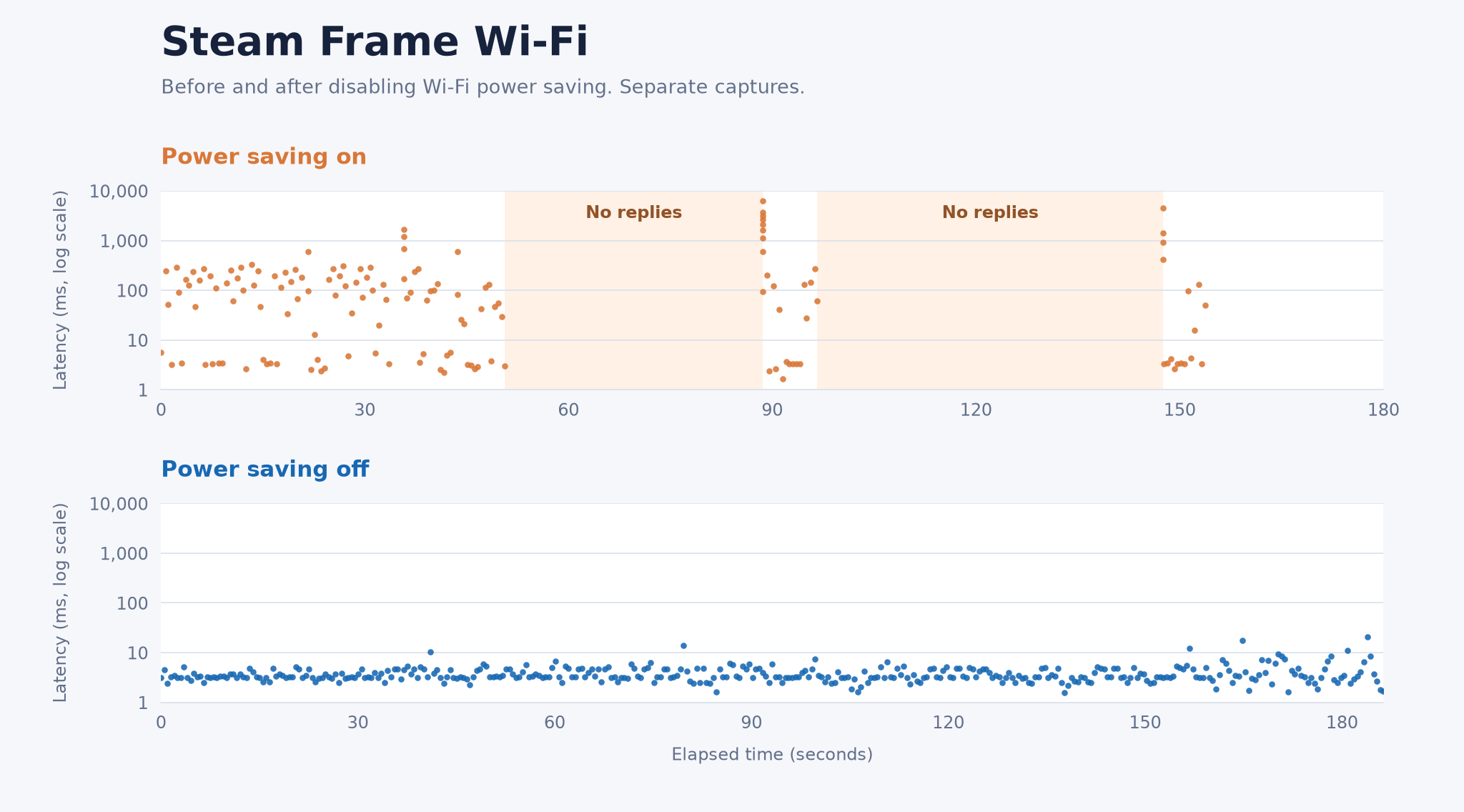
My Steam Frame’s Wi-Fi kept dropping out. It would work for a few seconds, stop responding, then come back. The signal was strong, but ping and SSH were unreliable.
Turning off Wi-Fi power saving stopped the stalls in my tests and brought latency down. I was using the built-in Wi-Fi in standalone mode.
SSH access
Enable Steam Settings → System → Enable Developer Mode.
I set the SSH password by connecting a physical keyboard to the Frame, switching to Desktop Mode and running this in Terminal:
passwdConnect from your computer, keeping the headset awake:
ssh steamos@frameUse the headset’s IP address if frame doesn’t resolve. Valve’s SSH documentation has more on connecting to the Frame.
Turn off Wi-Fi power saving
Check the interface name and its power-saving state. Mine was wlan0. Substitute yours if needed:
iw dev
iw dev wlan0 get power_save
Turn power saving off:
sudo iw dev wlan0 set power_save off
iw dev wlan0 get power_save
The result should be Power save: off. The change takes effect immediately. Leave a ping running from your computer to compare the connection before and after.
First attempt: save it in NetworkManager
I first saved the preference in NetworkManager so it would apply whenever this Wi-Fi profile connected:
nmcli -f NAME,UUID,TYPE,DEVICE connection show --activeFind the UUID of the Wi-Fi profile using wlan0. Note its original power-saving value before changing it:
PROFILE_UUID="paste-your-wifi-profile-uuid"
nmcli -g 802-11-wireless.powersave connection show uuid "$PROFILE_UUID"

sudo nmcli connection modify uuid "$PROFILE_UUID" \
  802-11-wireless.powersave 2

nmcli -g 802-11-wireless.powersave connection show uuid "$PROFILE_UUID"
NetworkManager uses 2 to disable power saving. Repeat this for each Wi-Fi profile where you need the fix.
When I next started the Frame, power saving was back on even though the saved profile still said disabled. I had to run the iw command again. Whether the reboot or an OS upgrade reset it is still unclear.
Automatically reapply the workaround
I added a small systemd service to catch those resets. It checks wlan0 about every ten seconds and turns power saving off when it finds it on. A NetworkManager hook also runs it after Wi-Fi reconnects. The timer leaves the headset asleep during suspend.
The installer also adds its files to SteamOS’s /etc/atomic-update.conf.d/ keep-list for OS updates. Igalia explains how this works.
Download and install it over SSH:
cd "$HOME"
curl -fL --retry 3 -o steam-frame-wifi-power-save.tar.gz \
  'https://kaspa.rs/content/files/2026/10/steam-frame-wifi-power-save-v1.0.0.tar.gz'
tar -xzf steam-frame-wifi-power-save.tar.gz
cd steam-frame-wifi-power-save
sha256sum -c SHA256SUMS && sudo bash install.sh
Check the live setting and timer:
iw dev wlan0 get power_save
systemctl is-active frame-wifi-power-save.timer
It reapplied the setting in my tests. I haven’t tested a full reboot or OS upgrade with this version yet.
Leaving power saving off may use more battery.
Undo the change
If you installed the automatic helper, remove it first:
cd "$HOME/steam-frame-wifi-power-save"
sudo bash uninstall.sh
Restore the original profile and interface settings. Set PROFILE_UUID again if you’re using a new SSH session. If the profile value was 0 and iw originally reported on:
sudo nmcli connection modify uuid "$PROFILE_UUID" \
  802-11-wireless.powersave 0
sudo iw dev wlan0 set power_save on
If disabling power saving doesn’t help, try another access point or a phone hotspot.


Comments ()